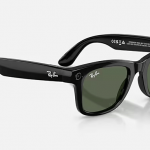


Ray-Ban Meta Smart Glasses (2nd Generation) Wayfarer
Ray-Ban Meta Smart Glasses (2nd Generation) Wayfarer
Couldn't load pickup availability
Ray-Ban | Meta Wayfarer Smart Glasses (Gen 2)
The Ray-Ban Meta Wayfarer Gen 2 smart glasses combine the iconic Wayfarer frame you know with a powerful built-in AI assistant, a 12-megapixel ultra-wide camera, open-ear speakers, and hands-free calling – all in a package that weighs under 50 grams and looks like a regular pair of Ray-Bans. For blind and low vision users, these glasses are a breakthrough: with built-in Meta AI that can describe your surroundings, read text aloud, and identify objects on command, plus Be My Eyes integration that connects you to sighted volunteers through the glasses' camera, you get hands-free visual assistance wherever you go – at a fraction of the cost of purpose-built assistive smart glasses.
This is the Gen 2 model released in September 2025, featuring nearly double the battery life of the original, upgraded 3K Ultra HD video, and Meta’s most advanced AI capabilities yet.
Available Styles
We carry two configurations of the Ray-Ban Meta Wayfarer Gen 2, both in the standard Wayfarer fit (model RW4012):
- Matte Black / Clear Lenses: The matte black frame gives a subtle, modern look. Clear plano lenses are perfect for everyday indoor and outdoor use, and they serve as an excellent base if you plan to have prescription lenses fitted later.
- Shiny Black / G-15 Green Lenses: The classic glossy black frame paired with Ray-Ban’s signature G-15 green sun lenses. These lenses block about 85% of visible light while preserving true color perception – ideal if you’ll be wearing them primarily outdoors or want sun protection built in.
Accessibility Features: Why These Glasses Matter
While the Ray-Ban Meta glasses weren’t originally designed as assistive technology, their combination of hands-free AI, camera-based scene description, and open-ear audio has made them one of the most compelling assistive technology products available today. Here’s what makes them so useful for blind and low vision users.
Meta AI Visual Assistant
Say “Hey Meta” followed by a question, and the built-in AI assistant responds through the open-ear speakers. What makes this especially powerful is the AI’s ability to see through the camera. Ask “Hey Meta, describe what’s in front of me” and it provides a detailed audio description of your surroundings. Ask “Hey Meta, read this” while looking at a document, menu, or sign, and it reads the text aloud. You can identify products while shopping, get descriptions of landmarks, translate foreign text, and even ask the AI to help you find specific items on a shelf. For more thorough readings, try “Hey Meta, read every single word” to override the AI’s tendency to summarize.
The Live AI mode, introduced in mid-2025, takes this further by enabling continuous natural conversation. Once activated, the AI watches your environment in real time and you can ask follow-up questions without repeating the wake phrase each time.
Be My Eyes Integration
Say “Hey Meta, Be My Eyes” to connect with one of over 8 million sighted volunteers worldwide. The volunteer sees exactly what the glasses' camera sees and provides real-time guidance through the speakers. This hands-free design is what makes it so practical – you can manage luggage, a guide dog, groceries, or a white cane while receiving visual assistance. During a call, double-tapping the capture button lets you switch between the glasses camera and your smartphone camera for different viewing angles. Be My Eyes is available in the US, Canada, UK, Ireland, Australia, France, Germany, Italy, Spain, and additional countries.
Conversation Focus
Added in December 2025, Conversation Focus uses the five-microphone array to amplify the voice of the person you’re speaking with in noisy environments. This is especially helpful if you rely on audio clarity in busy settings like restaurants, conferences, or crowded stores.
Key Features
- 12 MP ultra-wide camera for photos (3024 × 4032) and 3K Ultra HD video (2203 × 2938) at up to 60 fps
- Five-microphone array for clear phone calls, voice commands, and immersive audio recording
- Custom open-ear speakers with spatial audio and bass-reflex system – hear your content without blocking out your environment
- Meta AI assistant with multimodal vision: describes scenes, reads text, identifies objects, translates text, and more
- Be My Eyes integration for hands-free connection to sighted volunteers
- Live AI mode for continuous, natural conversation with the AI assistant
- Hands-free calling and messaging through Bluetooth – works with WhatsApp, Messenger, and standard phone calls
- Music and audio through Spotify, Apple Music, Amazon Music, Audible, and iHeartRadio
- Livestreaming to Facebook Live and Instagram Live for up to 30 minutes
- Hyperlapse, slow motion, and dynamic photo capture modes
- IPX4 water resistance – splash-proof for rain and sweat
- Privacy LED – a visible white light illuminates whenever the camera is active, letting those around you know the camera is in use
Battery Life
The Gen 2 features nearly double the battery life compared to the previous generation. You can expect approximately 8 hours of moderate mixed use (a combination of AI queries, photos, calls, and audio), around 5 hours of continuous audio streaming, and about 5.3 hours of phone calls on a single charge. Standby time is approximately 19 hours. The included charging case provides roughly 6 additional full charges for a total of about 48 hours of use between case charges. A 20-minute quick charge gets you to 50%.
What’s in the Box
- Ray-Ban | Meta Wayfarer Gen 2 smart glasses
- Charging case with USB-C port and LED status indicator
- Cleaning cloth
- User manual and quick start guide
App and Setup
The glasses pair with the Meta AI app (formerly called Meta View), available for both iOS and Android. The app handles initial setup, firmware updates, photo and video management, settings, and AI conversation history. A Meta account is required. The Meta AI app is compatible with iOS VoiceOver and Android TalkBack for screen reader users.
To get started, download the Meta AI app, create or sign in to your Meta account, and follow the on-screen pairing instructions. The glasses use Bluetooth to pair with your phone, and AI features require an active internet connection through your phone’s data or Wi-Fi.
Controls at a Glance
- Capture button (right temple, near hinge): Press once for a photo, press and hold for video. Double-tap during a video call to switch between your phone camera and glasses camera.
- Touchpad (right temple arm): Swipe forward or back to adjust volume. Tap to play/pause audio. Tap and hold for Spotify Tap.
- Voice commands: “Hey Meta” activates the AI assistant. “Hey Meta, take a photo.” “Hey Meta, Be My Eyes.” “Hey Meta, call [contact name].” “Hey Meta, describe what’s in front of me.”
Share