
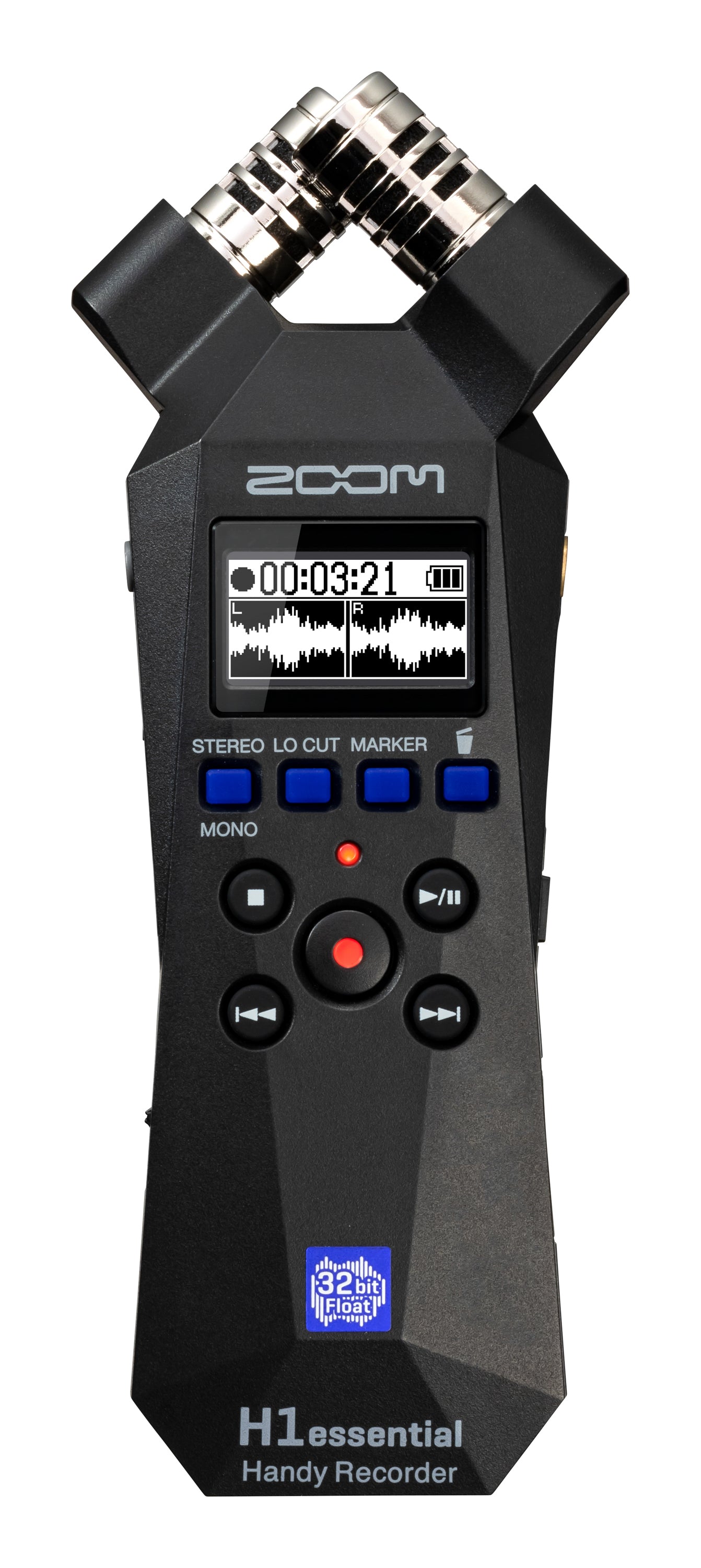
ZOOM H1essential 32-Bit Float Recording Talking Voice Recorder
ZOOM H1essential 32-Bit Float Recording Talking Voice Recorder
Couldn't load pickup availability
THE WORLD'S EASIEST RECORDER
\nWith the push of a button the H1essential captures perfect audio for musicians, podcasters, filmmakers, and content creators. Simply hit record and discover the power of 32-bit float.
\n32-BIT FLOAT MAGIC \u2728
\nWith 32-bit float recording, you never have to adjust levels. The H1essential captures every nuance of your sound ensuring high quality in every take.
\nTHE FIRST HANDY RECORDERS WITH ACCESSIBILITY
\nThe Essential Series was designed with Accessibility for the visually impaired. Navigate the menu with audible descriptions through the built-in speaker or headphones. Creators can choose English, Spanish, French, Japanese, German, Italian or Chinese.*
\nLOUD AND CLEAR
\nThe onboard X/Y microphones capture clean audio up to 120 dB SPL, equivalent to the sound of a high-performance motorcycle.
\nESSENTIAL FOR CREATORS
\nTHE PERFECT PRACTICE COMPANION FOR MUSICIANS Musicians can use the H1essential to record every practice and rehearsal, a great way to improve your playing. Features like overdubbing and playback-speed-adjustment are great for writing and practicing.
\nSAMPLING
\nWith its built-in mics and compact size, the H1essential is the perfect recorder to capture high-quality audio samples.
\nSOUND MAKES THE SCENE
\nThe H1essential is great for filmmakers. Record and send audio directly to your camera or use it to record sound effects to complete your scene.
\nFOR STORYTELLERS
\nPodcasters can mount the H1essential on a tripod for sit down conversations or use \"\u02dcmono mode' for on-the-go interviews.
\nBIG FEATURES, SMALL PACKAGE
\nThe H1essential has advanced features such as overdubbing, pre-record, auto record, and playback speed adjustment. BEST-IN-CLASS
\nUSB MICROPHONE
\nWhen connected to a PC, Mac, iOS, or Android using the USB-C Port, the H1essential can be used as a USB microphone while simultaneously recording to the SD card.
SOFT TOUCH CONTROLS
\nRecording and rotary controls have been meticulously designed to allow for quiet operation.
\nBUILT-IN SPEAKER
\nUse the built-in speaker to listen to your recordings for quick reference.
\nCAMERA FRIENDLY
\nUse the 3.5mm output to connect to a camera or plug in headphones to monitor audio.
\nLAVALIER READY
\nThe 3.5 mm mic/line input can be used with lavalier microphones for dialogue capture.
\nVIVID OLED SCREEN
\nThe high-contrast OLED screen makes it easy to navigate through the H1essential's simple interface.
\nSET MARKERS
\nThe H1essential has a dedicated Marker button to instantly set reference points while recording.
\nHIGH CAPACITY STORAGE
\nThe H1essential supports SDXC cards up to 1 TB to record hours and hours of audio. Essential Audio For Every Creator
\nBatteries
\nThis recorder requires two AAA batteries to function. If you'd like the ability of recharging the device, you must get Nickel-Metal Hydride rechargeable AAA batteries. Simply using the search term rechargeable AAA batteries should give you what you're looking for, but be sure to always be cautious when buying battery products, read reviews, keep an eye out for suspitious product listings.
\nKey Layout
\nTop Row
\n- \n
- Input Level Dial (directly below the microphone) \n
Row 2 (buttons below display)
\n- \n
- Audio Format (switches audio format) \n
- Low Cut filter adjustment \n
- Limiter \n
- Auto Level \n
Row 3
\n- \n
- Record \n
Row 4
\nThis row is composed of a grid of four buttons, two on the top and two on the bottom. The following list names these buttons from top left to bottom right.
\n- \n
- Stop/Option \n
- Play/Pause \n
- Rewind \n
- Fast Forward \n
Left Side - Top to Bottom
\n- \n
- Volume Wheel \n
- Power/Hold Slide Switch \n
Manuals & Resources
-
 Manual (External Link)
-
Zoom H1essential Demonstration and Review – Living Blindfully Podcast (Jonathan Mosen) (External Link)
-
Zoom H1 Essential: An Accessible Recorder - also great for creators! 16 minutes - Carrie on Accessibility (External Link)
-
Zoom H1 Essential Review: Is This the best Voice Recorder for Accessibility in 2024? 28 minutes - TheTechPianoPlayerKid (External Link)
-
 Zoom H1Essential Microphone Demo (MP3) — 1.6 MB
-
Zoom H1essential Support Page (button layout and audio demo) (External Link)
