

A. T. Guys
Stactiles - Tactile Stickers - QWERTY Keyboard (Black on White)
Stactiles - Tactile Stickers - QWERTY Keyboard (Black on White)
Couldn't load pickup availability
Master your keyboard with tactile stickers.
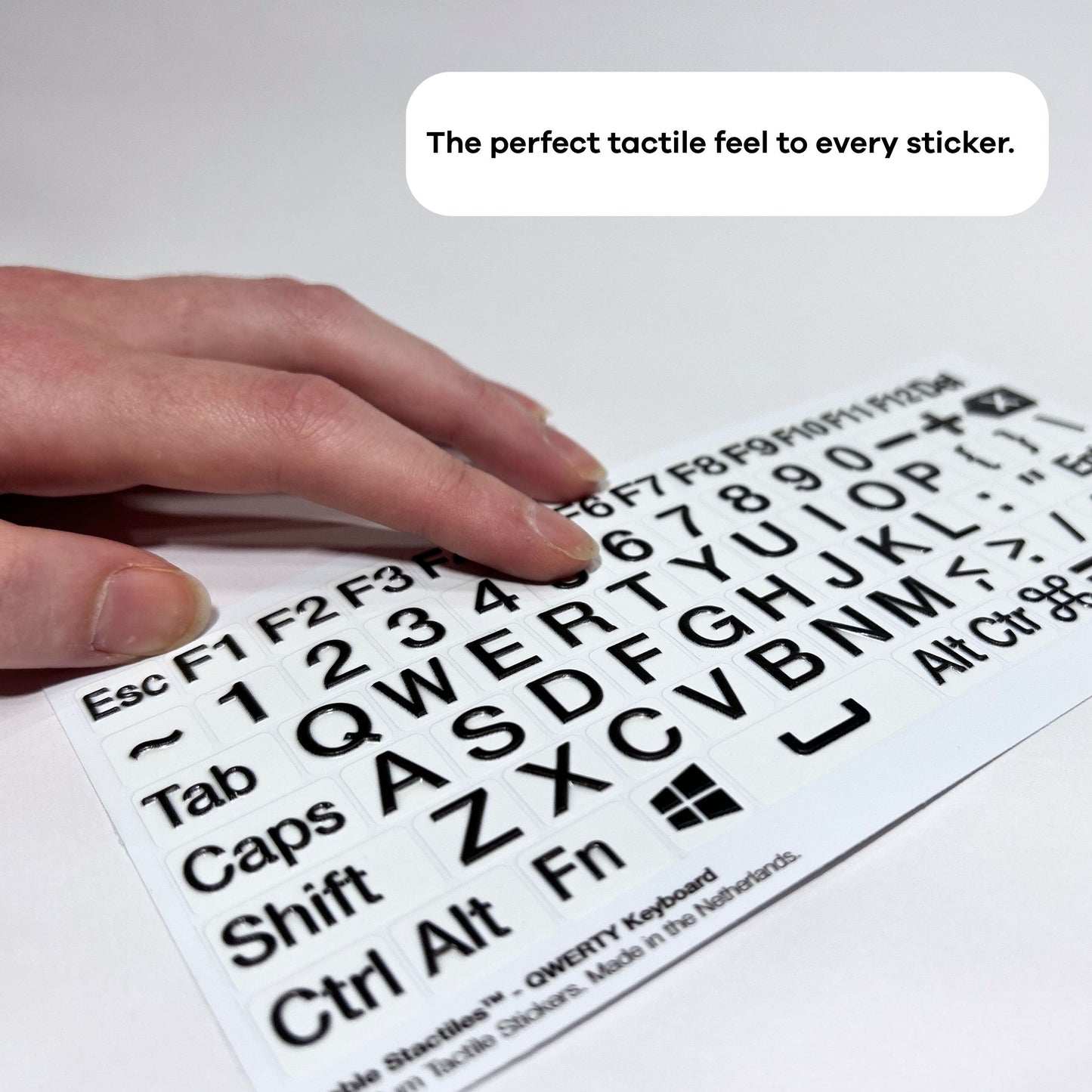
The Stactiles™ Keyboard Sheet is the ultimate accessibility upgrade for your digital workspace. This comprehensive set provides a full QWERTY layout, including function keys F1–F12, numbers, punctuation, and essential modifier keys like Ctrl, Alt, Command, and Shift. The individual stickers can also be applied for QWERTZ or AZERTY keyboard layouts.
Why invest in an expensive specialized tactile keyboard when you can transform the one you already own? Stactiles™ offers a professional-grade tactile experience at a fraction of the cost. Whether you are using a high-end laptop or a standard desktop keyboard, these stickers turn your keyboard into a more accessible, easy-to-navigate tool.
Designed in a black-on-white colorway, these stickers provide strong contrast for users with low vision who need clear visual cues. The sharp, raised details also provide tactile feedback for touch-typists and anyone learning to navigate a keyboard by feel.
Every sticker is crafted through Stactiles’ signature multi-layer production process. Unlike standard printed stickers that fade or flatten over time, Stactiles™ are engineered for long-term durability, helping each key stay readable through everyday typing.
Key Features
- Complete QWERTY Set: 80 stickers covering the full alphabet, number row, function keys, navigation arrows, punctuation, and system modifiers.
- High-Contrast Visibility: Bold black print on a bright white base provides strong legibility for users with visual impairments.
- Universal Compatibility: Sized to fit standard laptop keys and external desktop keyboards.
- Professional Tactile Feedback: Precision-engineered raised details help you locate keys by touch without needing to look.
- Cost-Effective Solution: Add tactile accessibility to your existing keyboard without buying a specialized accessible keyboard.
Who It’s For
- Students & Learners: A helpful tool for those learning the QWERTY, QWERTZ, or AZERTY layout or transitioning to touch-typing.
- Low Vision & Blind Users: Ideal for anyone seeking a high-contrast, tactile-rich way to interact with their computer independently.
- IT & Workspace Managers: An easy, durable way to make office equipment more inclusive and accessible.
Technical Details
- Quantity: 80 stickers per sheet.
- Layout: Standard QWERTY, international.
- Colorway: High-contrast black on white.
- Dimensions: Sized for standard computer keys.
- Material: Multi-layer UV-embossed premium vinyl.
- Adhesive: Permanent, industrial-strength grey acrylic adhesive.
- Durability: Heat-resistant, water-resistant, and wear-resistant for long-term typing.
- Origin: Designed and manufactured in the Netherlands.
What’s in the Package?
Your Stactiles™ Keyboard Sheet arrives in a protective, slim-profile Hable envelope designed to fit right through your mailbox. The sheet measures 200 × 100 mm and comes ready for immediate application. Simply peel and stick to start typing with clear tactile feedback.
Sticker-by-Sticker Contents
Starting top left to right, row by row:
- Esc: The abbreviation for the Escape key.
- F1: Function key 1.
- F2: Function key 2.
- F3: Function key 3.
- F4: Function key 4.
- F5: Function key 5.
- F6: Function key 6.
- F7: Function key 7.
- F8: Function key 8.
- F9: Function key 9.
- F10: Function key 10.
- F11: Function key 11.
- F12: Function key 12.
- Del: The abbreviation for the Delete key.
- A tilde symbol.
- 1: Number 1.
- 2: Number 2.
- 3: Number 3.
- 4: Number 4.
- 5: Number 5.
- 6: Number 6.
- 7: Number 7.
- 8: Number 8.
- 9: Number 9.
- 0: Number 0.
- A minus sign or hyphen.
- A plus sign.
- Backspace icon: An arrow pointing left with an 'X' inside.
- Tab: The word "Tab" for the Tabulator key.
- Letter Q.
- Letter W.
- Letter E.
- Letter R.
- Letter T.
- Letter Y.
- Letter U.
- Letter I.
- Letter O.
- Letter P.
- Opening curly bracket.
- Closing curly bracket.
- A backslash symbol.
- Caps: The abbreviation for the Caps Lock key.
- Letter A.
- Letter S.
- Letter D.
- Letter F.
- Letter G.
- Letter H.
- Letter J.
- Letter K.
- Letter L.
- A colon.
- A double quotation mark.
- Enter: The return key.
- Shift: The capital letter key.
- Letter Z.
- Letter X.
- Letter C.
- Letter V.
- Letter B.
- Letter N.
- Letter M.
- A less-than symbol and a comma.
- A greater-than symbol and a period.
- A question mark and a forward slash.
- A solid arrow pointing up.
- An outlined arrow pointing up.
- Ctrl: The abbreviation for the Control key.
- Alt: The abbreviation for the Alternate key.
- Fn: The abbreviation for the Function key.
- Windows logo.
- Space bar icon: A wide horizontal bracket representing the space bar.
- Alt: A second Alternate key.
- Ctr: A shortened abbreviation for the Control key.
- Command icon: The loop symbol for the Mac Command key.
- Three horizontal bars, menu icon.
- A solid black arrow pointing left.
- A solid black arrow pointing down.
- A solid black arrow pointing right.
Share